
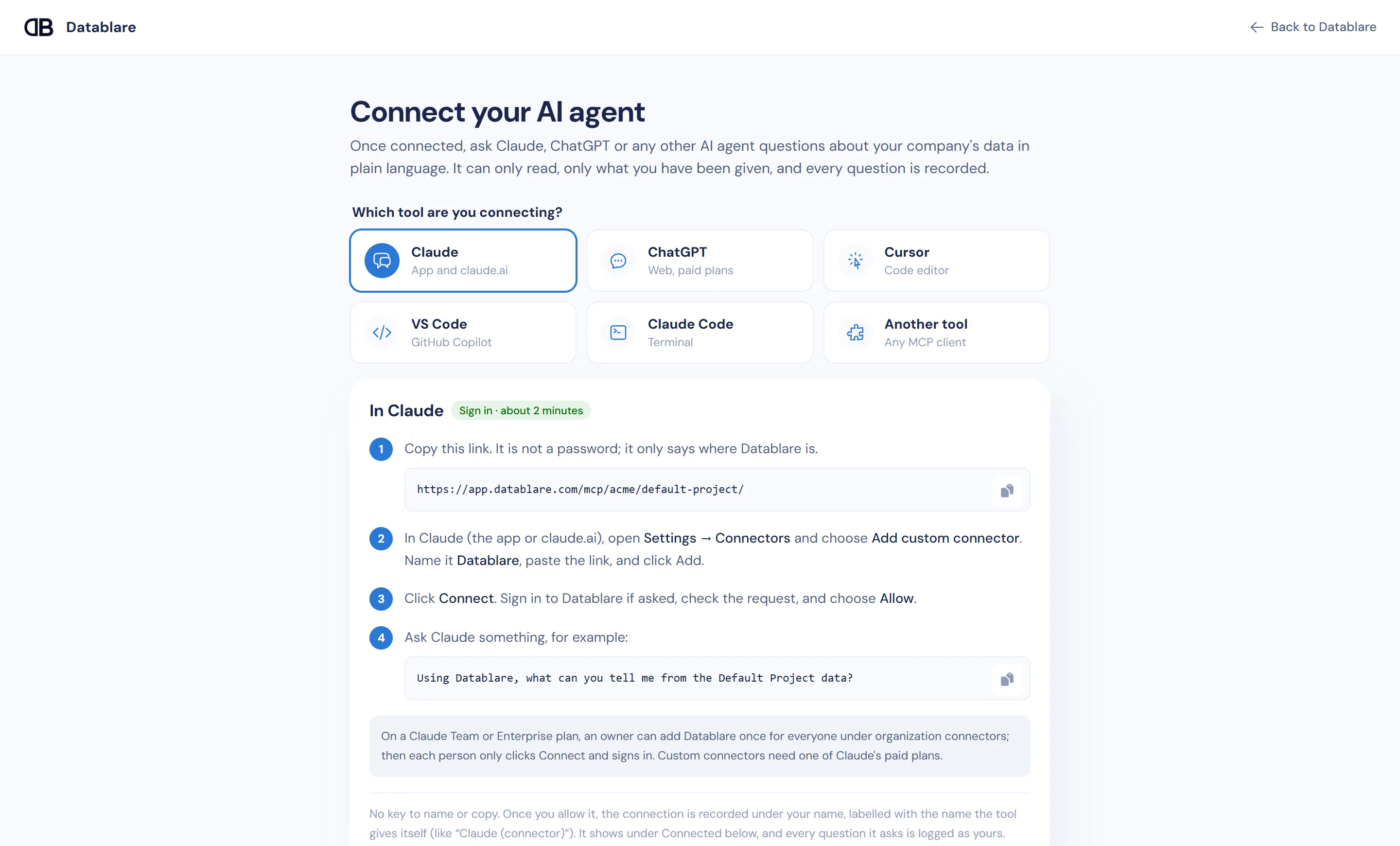
To give Claude Code database access through MCP, run one command, claude mcp add --transport http with your Datablare project link, then type /mcp in Claude Code, choose Authenticate and allow it in the browser. Claude Code can then query your PostgreSQL, MySQL, Snowflake or other database while it works in your repository: read-only, limited to the tables and columns you expose, with every query in Datablare’s audit log.
The usual Claude Code postgres MCP setup, and its gaps
Searching “claude code postgres mcp” turns up local servers started with a full connection string. That is fine for a throwaway database. For anything shared it means:
- a credential in your shell history or project config, often a superuser on dev;
- an agent that can run whatever that login can, including writes;
- no record of the queries outside your terminal scrollback;
- one setup per developer, each with its own password to rotate.
What Datablare changes
Datablare is a remote MCP server; Claude Code talks to it over HTTP and never holds a database password.
- Read-only, enforced twice. The SQL guard lets through one
SELECT,WITHorVALUESstatement and nothing else: noCOPY,SET,DO,CALL,pg_sleepordblink. Then the database itself keeps it read-only: a read-only session, or an always rolled-back transaction on SQL Server and Snowflake. - Scoped per project. Expose only the tables the work needs; hide columns with personal data. A bare name like
ordersresolves only to an exposed table, never to an unexposed one that happens to come first in the search path. - Bounded. 1,000 rows by default, 5,000 at most; 30 seconds by default, 60 at most.
- Audited. Every call is recorded under your name in Audit.
- Revocable. Disconnect from the Connect page, revoke a key, or have an admin remove access, and it stops.
Datablare is hosted in India and does not store result rows. More: how it works, security.
The command
The Connect page fills in your server name and link:
claude mcp add --transport http datablare-your-project \
  https://app.datablare.com/mcp/your-company/your-project/
Then, inside Claude Code:
/mcpPick the Datablare server, choose Authenticate, sign in and click Allow.
With a personal key
For CI jobs or remote machines without a browser, use a personal key instead of signing in:
claude mcp add --transport http datablare-your-project \
  https://app.datablare.com/mcp/your-company/your-project/ \
  --header "Authorization: Bearer dblr_..."
Name the key after what uses it (“Claude Code on build box”) so you can switch one off without the others.
What Claude Code can call
Datablare exposes a small set of tools: list your projects and data sources, list the exposed tables, read the context you wrote (descriptions, rules, example questions), and run a read query. Good context, such as “amount is in paise” or “exclude test orders”, makes the SQL right the first time.
Create a read-only login first
Give Datablare its own Postgres role, then prove it cannot write before you connect it:
CREATE ROLE datablare_reader LOGIN PASSWORD 'choose-a-strong-password'
  CONNECTION LIMIT 5;
ALTER ROLE datablare_reader SET idle_in_transaction_session_timeout = '60s';
GRANT USAGE ON SCHEMA public TO datablare_reader;
GRANT SELECT ON ALL TABLES IN SCHEMA public TO datablare_reader;

-- Signed in as datablare_reader, this must fail with "permission denied":
-- INSERT INTO public.orders DEFAULT VALUES;
Datablare’s connection test also reports whether the login can only read. Other engines: PostgreSQL, MySQL, Snowflake.
Try it on the e-commerce sample
Connect the one-click sample, then ask Claude Code:
- Which articles have a reduced price, and by how much on average?
- How many orders were placed per day last week?
- Which product labels have no active products?
Get started
Sign up free, copy the command from the Connect page, and authenticate. See pricing for plans, or set up Cursor or VS Code next.