
How it works
Connect AI to your database, without handing over the keys
To connect AI to a database with Datablare, you add the database once, choose the tables and columns agents may read, and paste one MCP link into Claude, ChatGPT, Cursor or VS Code. People then ask questions in plain English; every query is checked, run read-only and recorded.
Setup
Four steps from database to answers
Or two minutes with the e-commerce sample, if you just want to see answers first.
- Step 1
Step 1
Connect a database
Add PostgreSQL, MySQL, MariaDB, SQL Server, Oracle, ClickHouse or Snowflake, directly or through an SSH tunnel. Or try the e-commerce sample in one click.
- Step 2
Step 2
Choose what agents read, and what it means
Pick the tables each project exposes, hide sensitive columns and give people a role. Add descriptions, rules and example questions so agents use your definitions.
- Step 3
Step 3
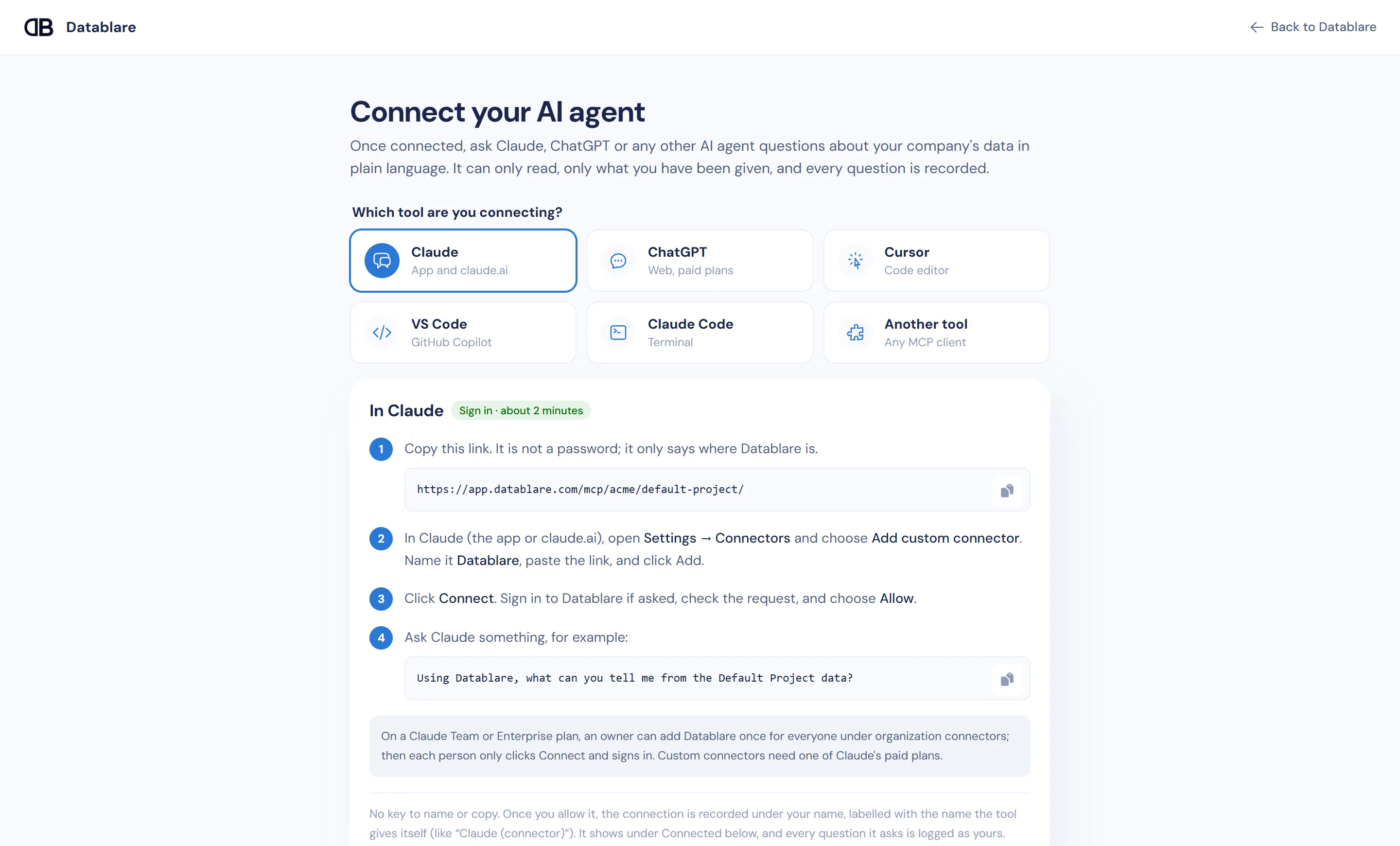
Connect your AI tool
Copy the project’s MCP link into Claude, ChatGPT, Cursor, VS Code or Claude Code. Sign in to Datablare and click Allow.
- Step 4
Step 4
Ask, and see every query
Ask in plain English. The agent writes SQL, Datablare checks it and runs it read-only, and Audit records who asked and what ran.
Remote MCP server
One link per project. People sign in as themselves.
Datablare is a remote MCP server, so nothing runs on anyone’s laptop. Each project has a link like
app.datablare.com/mcp/acme/sales/. It is not a password: it only says where Datablare is.
- Sign in with OAuth by default; a personal key is the fallback for tools that cannot sign in.
- Analysts and above approve their own connection; viewers send a request to an admin.
- Every connection is recorded under the person’s name. Revoke it in one click.
Setup guides: Claude · ChatGPT · Cursor · VS Code · Claude Code
Under the hood
Ask your database in plain English: what happens next
The agent does the SQL; Datablare does the governance. Here is the path of one question.
- 1
list_tablesThe agent reads the context
When someone asks a question, the AI tool calls Datablare’s MCP tools. It first gets the project’s brief and the tables it may use, with the descriptions, rules and example questions your team wrote in Modeling.
- 2
query_data_sourceIt writes one SQL query
The agent writes a single SELECT for the question and sends it with the question itself, so the audit log records why the query ran, not only what it was.
- 3
guardDatablare checks it
The SQL guard refuses anything but one read. The tables must be on the project’s list, and no hidden column may be read, even through SELECT *, an alias or a subquery.
- 4
read-onlyThe database runs it read-only
The query runs in a read-only session (PostgreSQL, MySQL, MariaDB, Oracle, ClickHouse) or a transaction that is always rolled back (SQL Server, Snowflake), with a time limit.
- 5
pass-throughRows go back to the agent
Results pass straight through to the AI tool, which turns them into an answer. Datablare never stores the rows.
- 6
auditEverything is recorded
Audit keeps who asked, the question, the SQL, the tables touched, the row count and the timing, plus any refusal and the reason for it.
One project, many databases
One MCP link. All your databases.
Connect PostgreSQL, MySQL, Snowflake and more to one project. Your team adds a single link to Claude or ChatGPT and asks questions that span them, with one access policy and one audit log.
Illustration. Claude, ChatGPT and Cursor all connect to one Datablare MCP link for a project. The project has three databases: PostgreSQL holding orders, MySQL holding the CRM, and Snowflake holding finance data. When someone asks a question that spans them, the agent sends one read-only query to each database it needs. Datablare checks every query, runs it on the right database, and records it in the audit log. The agent then combines the results into one answer.
“Which customers in the CRM spent over ₹1 lakh last month?”
The agent queried CRM and Orders separately and combined the results. Both queries are in Audit, under the person who asked.
Illustration. One query runs on one database; the agent combines the answers. Names and figures are examples.
Context layer
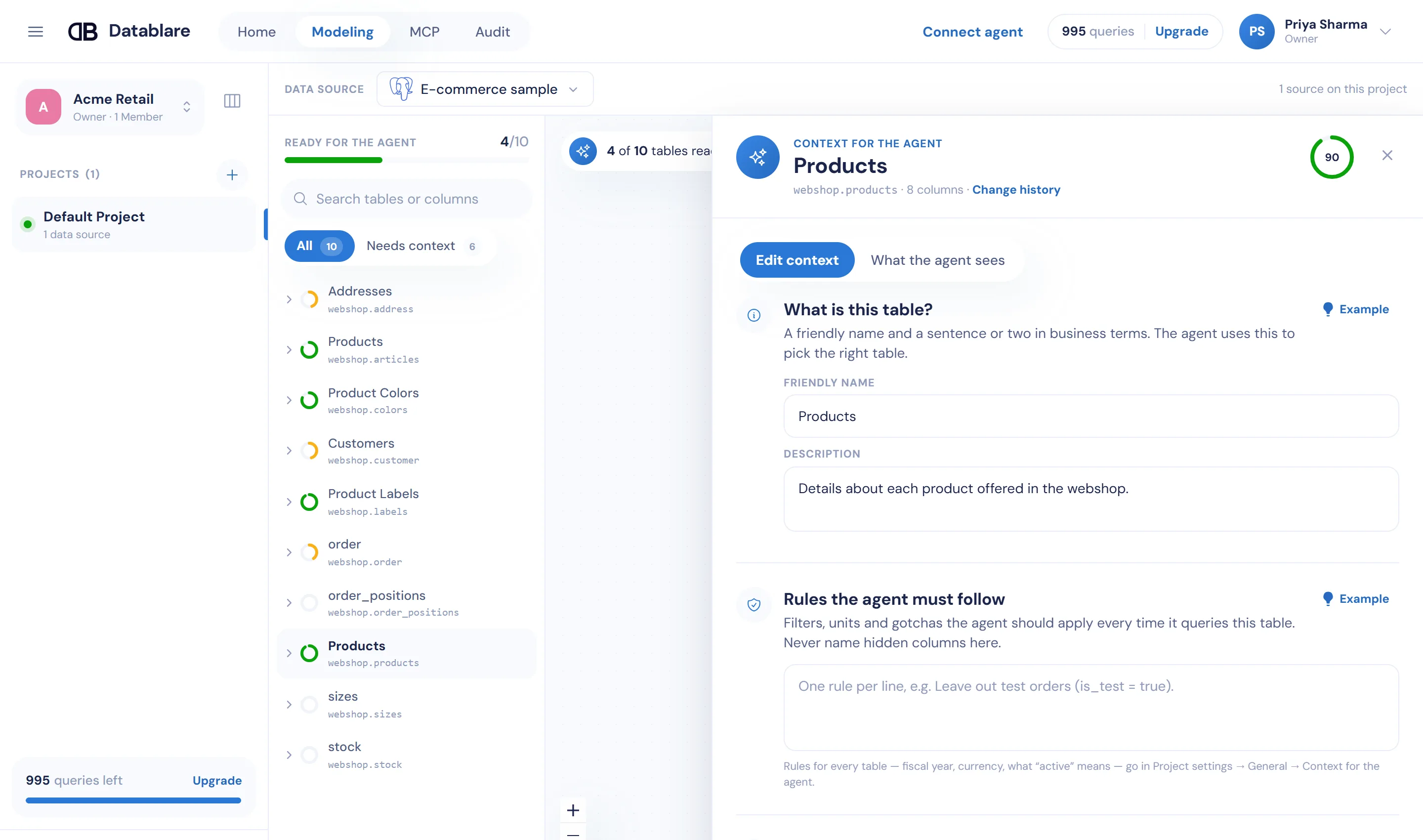
Teach the agent your business, once
Column names like amt_net mean nothing to an AI. In Modeling you give tables friendly names, descriptions,
rules (“leave out test orders”) and example questions. The agent reads them before it writes SQL, so answers match how your team
talks about the business.
Hide a column here and it disappears for every agent in the project. Write rules once and every client gets them.
See context with and without, side by sideText to SQL vs MCP
Why an MCP gateway instead of another chat-with-data app
A text-to-SQL app
- Another app and another login for everyone
- Answers live outside the tools people already use
- Governance depends on that one vendor’s app
Datablare over MCP
- Ask in Claude, ChatGPT, Cursor or VS Code
- Combine database answers with everything else the agent can do
- One set of rules and one audit log, whichever AI tool asks
FAQ
Connecting AI to a database: common questions
What do I need to connect AI to a database with Datablare?
A Datablare account, a database Datablare can reach (PostgreSQL, MySQL, MariaDB, SQL Server, Oracle, ClickHouse or Snowflake, directly or through an SSH tunnel) and an AI tool that supports remote MCP servers, such as Claude, ChatGPT, Cursor, VS Code or Claude Code. You can start with the built-in e-commerce sample instead of your own database.
Do I have to install anything?
No. Datablare is a remote MCP server: each project has one link, and you paste it into your AI tool. There is no local server, Docker container or config file with a password on anyone’s laptop.
What is the difference between text-to-SQL and MCP?
A text-to-SQL tool turns a question into SQL inside its own app. With MCP, the AI tool your team already uses (Claude, ChatGPT, Cursor) calls Datablare to read the schema and run queries, and then answers in the same chat. Datablare adds the governance around those calls: read-only, allowed tables and columns, per-person access and an audit log.
How big can a result be?
By default a query returns up to 1,000 rows, and an agent can ask for up to 5,000. Queries time out after 30 seconds by default, 60 at most, and results are capped at 1 MB so a single question cannot flood the agent.
Does the agent need to know our schema?
It reads it through Datablare: tables and columns you exposed, with the descriptions, rules and example questions you wrote in Modeling. The better the context, the better the SQL it writes.
Can I see what the agent ran?
Yes. Every call appears in Audit with the question, the SQL, the tables it touched, how many rows came back and how long it took. Refused queries are there too, with the reason.
Give your team answers, not database logins.
Start free with the e-commerce sample or your own database. Connect Claude in about two minutes.
30 minutes with the founder. Or WhatsApp / [email protected]