
Context for AI agents
Teach AI agents your data, once
Agents get the right column names from the schema. They get the right answer from what your team knows: what each table means, which rows to leave out, how revenue is counted. Write it once in Datablare and every agent reads it before it writes SQL.
Why agents get numbers wrong
The schema says what exists. It doesn’t say what it means.
An agent that only sees table and column names has to guess. Its guesses look like answers, which is the problem.
-
Names that mean nothing
amt_p, is_tst, status = 3. Column names make sense to the engineer who wrote them, not to an AI reading them for the first time.
-
Definitions that live in people’s heads
What counts as revenue, an active customer or this financial year is a decision your team made. The database does not say.
-
Several tables that look right
orders, order_items, refunds, orders_archive. Without a hint, an agent picks one and answers confidently from it.
Here is what that looks like on one table
orders · 6 columns
amt_p 314218 An amount in rupees? Order total in paise. Divide by 100 for rupees. status 3 Three… what? 1 = paid, 2 = shipped, 3 = refunded. is_tst true Some kind of flag Test order placed by our team. Leave it out of every report. cust_typ 'B' B for… best customer? B = business buyer with a GSTIN, C = consumer. zone_cd 'NE' Nebraska? North-east? NE = our North-East India sales zone. created_at 2026-10-04 18:40 Local time, probably Stored in UTC. Count days in IST. Written once, read by every agent. Datablare sends these descriptions with the schema before the agent writes SQL, in Claude, ChatGPT, Cursor or VS Code.
Illustrative example. Your columns, your descriptions.
See the difference
Same question, with and without context
Switch between the two to see what three rules and one sentence about your financial year change.
Asked in Claude: “What was our revenue this financial year?”
What the agent reads
One row per order placed on the website, including cancelled ones.
- id bigint Order number
- amt_p bigint Order total, in paise
- status text paid, cancelled or refunded
- is_tst boolean Test order placed by our team
- created_at timestamptz When the order was placed
amt_p, is_tst and “this financial year” mean. Rules the agent must follow
- amt_p is in paise: divide by 100 for rupees.
- Leave out rows where is_tst is true.
- Revenue counts orders with status ‘paid’ only.
Context for the whole project
Our financial year runs from 1 April to 31 March.
What the agent writes
SELECT SUM(amt_p) AS revenue
FROM orders
WHERE created_at >= '2026-01-01';
SELECT SUM(amt_p) / 100.0 AS revenue_inr
FROM orders
WHERE status = 'paid'
AND is_tst = false
AND created_at >= '2026-04-01';Answer
₹48,21,93,500
- Paise read as rupees
- Calendar year, not April–March
- Test and cancelled orders counted
Answer, from 1 April 2026
₹31,42,180
“I converted paise to rupees, counted paid orders only and left out test orders, as your notes ask.”
A wrong number that looks right is worse than an error: nobody knows to question it.
Written once in Modeling, used by every agent in the project, in Claude, ChatGPT, Cursor or VS Code, on every question.
Illustrative example. Table, rules and figures are made up to show the idea.
What you write
Brief the agent the way you would brief a new analyst
A few sentences per table, written in Modeling. Plain English is enough.
-
What a table is
A friendly name and a sentence on what one row means.
“One row per order placed on the website, including cancelled ones.”
-
Rules the agent must follow
Filters, units and exclusions to apply in every query against the table.
“amt_p is in paise, so divide by 100. Leave out rows where is_tst is true.”
-
Questions people ask
Up to ten real questions the table answers, so the agent picks the right one.
“How many orders did we get last week?”
-
What a column means
A short description for any column whose name does not explain itself.
“status: paid, cancelled or refunded.”
-
How tables connect
What each link between two tables means, which is where joins go wrong.
“The customer who placed the order.”
-
Context for the whole project
Things that apply everywhere: your financial year, definitions, abbreviations.
“Our financial year runs from 1 April to 31 March.”
How the agent gets it
Delivered with the schema, before every query
- 1
The agent connects
At the start of every session it calls get_datablare_context: how to work with your data, your project-wide context, and the language to answer in.
- 2
It reads before it writes
Before any SQL it calls list_tables: the real table and column names with your friendly names, descriptions, rules and example questions. Hidden columns are left out.
- 3
It writes the query your way
It is told to apply your rules in every query against a table and to say when a rule changed the result.
- 4
You can check it
Datablare runs the query read-only and Audit records the question and the exact SQL, so you can see whether the context was followed.
{
  "table": "public.orders",
  "alias": "Orders",
  "description": "One row per order placed on the
    website, including cancelled ones.",
  "queryable": true,
  "agent_notes": "amt_p is in paise: divide by 100
    for rupees. Leave out rows where is_tst is true.",
  "example_questions": [
    "How many orders did we get last week?"
  ],
  "columns": [
    { "name": "amt_p", "type": "bigint",
      "alias": "Amount",
      "description": "Order total, in paise" },
    …
  ]
}
Field names as Datablare sends them; values are an example.
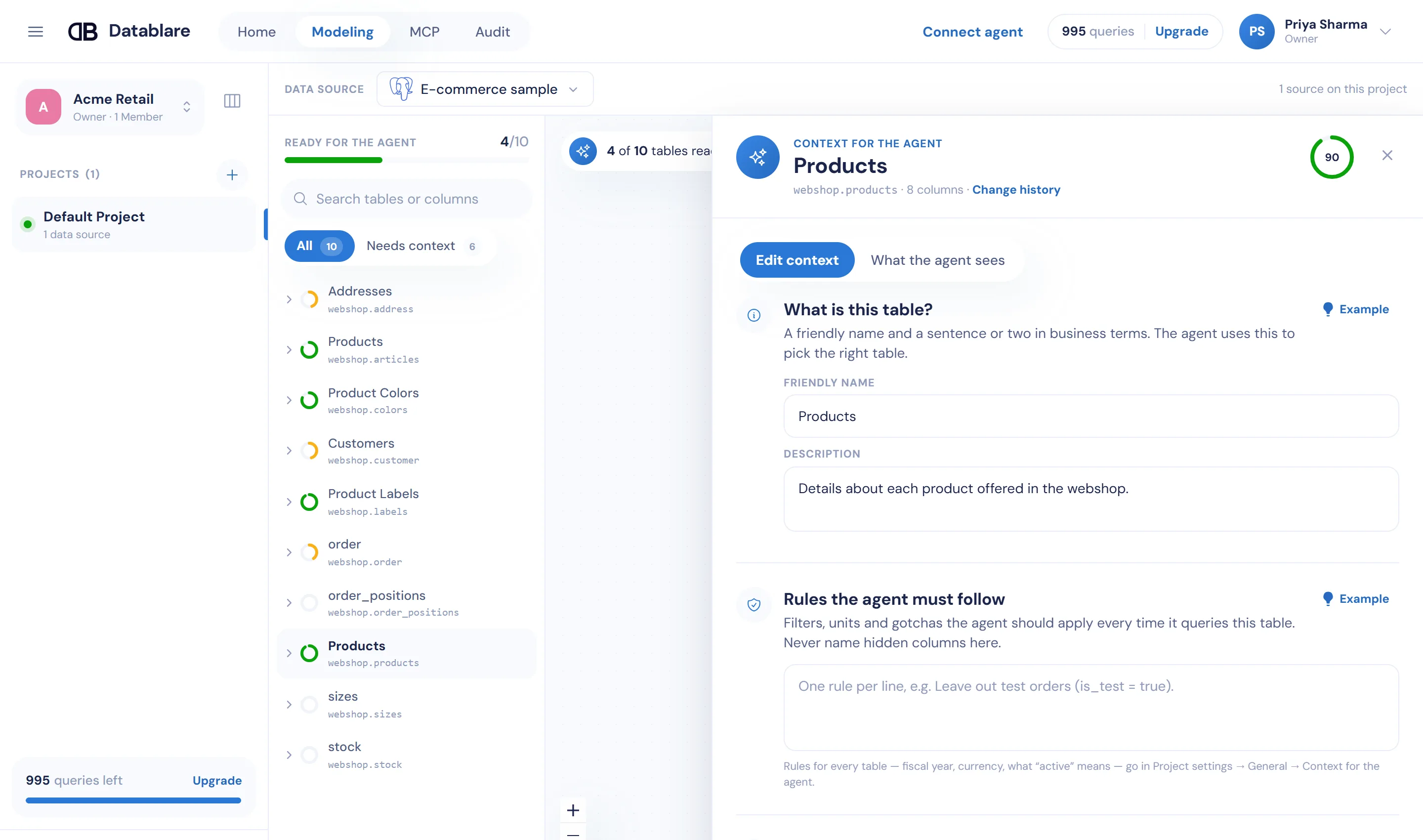
Built into Modeling
Quick to write, easy to keep up to date
-
A completeness ring per table
See at a glance which tables are well described and which still need a sentence.
-
“What the agent sees”
Read the exact answer an agent gets for a table, the same output the agent receives.
-
Suggest with AI
Chrome’s built-in AI drafts descriptions, rules and questions on your computer, from table and column names and types, never your rows. You accept or edit each draft.
-
A sample that arrives described
The one-click e-commerce sample comes with its context already written, so you can see the difference before writing your own.
-
Every edit on record
Changes to context are logged in Audit → Changes: who changed what, and when.
-
Answer language and time zone
Agents answer in English, Hindi and five other languages, and count days in your project’s time zone.
Write once
One briefing for every tool, every person, every database
Context lives in the project, not in a chat. Everyone who connects to the project’s MCP link gets the same descriptions and rules, whichever AI tool they use and whichever database in the project they ask about. Nobody pastes a data dictionary into a prompt again.
Context guides. Access is enforced.
Descriptions and rules shape how an agent writes its query. They never widen what it may read: tables outside the project and hidden columns are refused by Datablare, whatever the context or the prompt says. Keep hidden columns out of your descriptions; the agent cannot use them anyway.
How access is enforced Is this a semantic layer?
Not in the dbt or Cube sense: Datablare does not compile metric definitions into SQL. It is the briefing a good analyst would give a new colleague: what each table is, the rules to apply, the questions it answers and how tables connect. The agent reads it before it writes SQL. If you already keep metric definitions somewhere, write the important ones as rules.
Does the agent always follow my rules?
Datablare sends your context to the agent and tells it to apply your rules in every query, and to say when a rule changed the result. The model writes the SQL, so check its work in Audit, especially in the first weeks. What an agent may read is different: tables and hidden columns are enforced by Datablare whatever the agent decides.
Can context give an agent access to more data?
No. Context only explains your data. A hidden column stays hidden and a table outside the project stays refused, whatever a description or rule says.
Does reading context use our query allowance?
No. Listing tables and reading the project’s context do not count as queries. Only queries an agent runs successfully count.
Who can write context?
Analysts and above in a project. Changes save as you type, and every edit is recorded in Audit → Changes.
Do we have to write context for every table?
No. Agents can work from table and column names alone. Start with the five tables people ask about most, and add rules wherever a number has a catch: units, test data, cancelled orders, time zones.
Give your team answers, not database logins.
Start free with the e-commerce sample or your own database. Connect Claude in about two minutes.
30 minutes with the founder. Or WhatsApp / [email protected]